

Split bills and manage subscriptions in iMessage
Log a dinner, see who owes what and keep track of renewals, right in the chat you already use.
Try a split or track a renewal. No account needed. Private beta.


- You: I paid CA$60.00 for dinner. split it with Maya
- Koba: Maya owes you CA$30.00
- You: track my music subscription, CA$20.99 on the 3rd
- Koba: tracking it: CA$20.99 a month, next renewal Dec 3


The launch film · 0:47
Money with friends, minus the awkward part
Splits, budgets and trip plans, sorted in the group chat you already have.

What Koba does for you
The bill is handled in the chat
Send the receipt. Koba keeps the split clear, updates it when plans change, and keeps everyone on the same page. Friends take part from the group chat without the app.
- Priya: home safe! thank you all for the best weekend
- Priya: avery you planned it perfectly
- Leo: same, already miss that beach
- Maya: we have to do it again in the spring
- You: let’s square up so nobody has to think about it
- You: @koba where did everyone land for the weekend
- Koba: the weekend is ready to settle maya CA$169.68 to avery leo CA$169.68 to avery priya paid oct 18
- Maya: can I pay you friday avery
- You: friday works
- Koba: noted: maya pays friday. no reminder to maya before then
- Leo: just sent mine avery
- Koba: thanks leo. avery, confirm the CA$169.68 when you see it
- You: got it
- Koba: leo’s settled. maya is the only one left
Useful updates from the email you already get
Keep receipts, subscriptions and refunds together, without turning every email into another notification.
- You: did the internet bill come in?
- Koba: yes, Fernline Internet, CA$85.00, due Fri, Oct 23
- You: remind me to call the landlord tomorrow at 9
- Koba: done. I’ll remind you mon oct 19 at 9:00 am
- You: thank you!
- Koba: anytime. good night avery
- You: anything useful in my email this week?
- Koba: 3 useful things from your inbox this week Linden Home receipt, CA$24.00 Notewell Pro renewal, CA$12.00 a CA$8.00 refund on the lamp
- Koba: Notewell Pro renews monthly. is it yours or the house’s?
- You: mine
- Koba: saved as your subscription, CA$12.00 a month next renewal Sun, Nov 15
- Koba: Linden Home refunded CA$8.00 on the CA$24.00 lamp. apply it?
- You: yes
- Koba: done. the lamp now counts as CA$16.00
Know what renews before it charges
Tell Koba what you pay for, or let it find renewals in your email. Ask what is coming up and get a reminder before the one you want to cancel.
- You: what renews this week?
- Koba: two things: Streamly CA$11.99 on Thu PhotoPro CA$29.99 on Sat
- You: remind me the day before photopro
- Koba: set. I’ll text you Fri at 9am so you can cancel it first if you want

All the ways to use Koba
MoneyShared costs, your own budget and the bank behind them.
PeopleGroup chats, the right names and what each person can see.
PlansReminders, and rules for what Koba handles on its own.

Your money is kept private
- AES-256
- At rest, by our host Supabase
- TLS 1.2+
- HTTPS only, in transit
- SOC 2
- Type 2, held by Plaid
- ISO 27001
- and 27701, held by Plaid
Plaid, which runs Koba’s bank connections, lists SOC 2 Type 2, ISO/IEC 27001 and ISO/IEC 27701 on its trust center. They describe Plaid, not Koba’s own app.
Encrypted in transit and at rest
Koba’s website and servers accept only encrypted HTTPS connections (TLS 1.2 or 1.3). Our database and file storage provider, Supabase, encrypts stored data with AES-256. The keys that connect Koba to your bank, Gmail and calendar are encrypted again by Koba before they are stored, and only Koba’s servers can use them.
Connected through Plaid
Bank connections run through Plaid. You sign in to your bank on Plaid’s screen, so Koba never sees your bank username or password. Koba asks Plaid only for your transactions and account details, read-only: it cannot move money.
Your data is yours
Koba keeps the emails it finds useful (receipts, bookings, subscriptions) and the details it takes from them until you delete them. To read them it sends them to OpenAI, whose API terms say it does not train on that data and keeps it for up to 30 days for abuse monitoring. We never sell your data or use it for ads, and share it only with the providers named in our Privacy Policy.
You’re in control
Your memories are private to you, and you can see and delete them in the app. Disconnect any account at any time, and delete what Koba read from it. Deleting your account erases what is yours alone; a split or payment you share stays for the other person under “Deleted user”.

Choose how you use Koba
YearlyBest value
For people who keep Koba around.
CA$119.99/ yr.
About CA$10 a month, billed yearly. Save 23%
- Trial
- 7 days free
- Then
- CA$119.99/year
Monthly
The simple default.
CA$12.99/ mo.
Billed monthly, cancel any time.
- Trial
- 7 days free
- Then
- CA$12.99/month
Weekly
For trips and short runs.
CA$4.99/ wk.
Billed weekly, cancel any time.
- Trial
- 7 days free
- Then
- CA$4.99/week
Prices in Canadian dollars. In the United States, Koba Premium is billed in US dollars.
Koba Premium is the same on every billing period; only the commitment changes. Prices are in Canadian dollars. New subscribers start with a free trial: 7 days on every plan, one trial per account. Cancel any time. Any space with one Premium member is fully covered for everyone in it. Your friends never pay, never download anything, and never hit a paywall. Pricing details
Questions
How do I get Koba?
Text Koba from your iPhone, iPad or Mac. A split, a debt or a subscription works right away with no account, and saving it to a free account takes a minute whenever you want. Koba is in private beta, so some features, like bank and email connections, open over time.
Do my friends need Koba?
Not to take part in a group. Friends in a group chat with Koba see their share there, ask about it there and pay you back however they already do. Using Koba for their own money takes an account, and a card link shows its details after they sign in.
What about friends who use Android?
Koba lives in iMessage, on iPhone, iPad and Mac. Everything Koba links to, like someone’s share of a bill or a request to pay you back, is a web page that opens in any browser, so a friend on Android can open it when you send it to them. Receipt photos need iMessage.
What does connecting my email do?
Koba reads purchases, renewals, refunds and bookings, read-only, and turns them into records with the email linked. Anything ambiguous, or anything that changes someone else’s share, asks you first.
How does paying each other back work?
Koba works out one amount per person and sends each their own request. You pay the way you already do, and a payment counts once the person who was paid confirms it. Koba never holds or moves the money.
Prefer a screen?
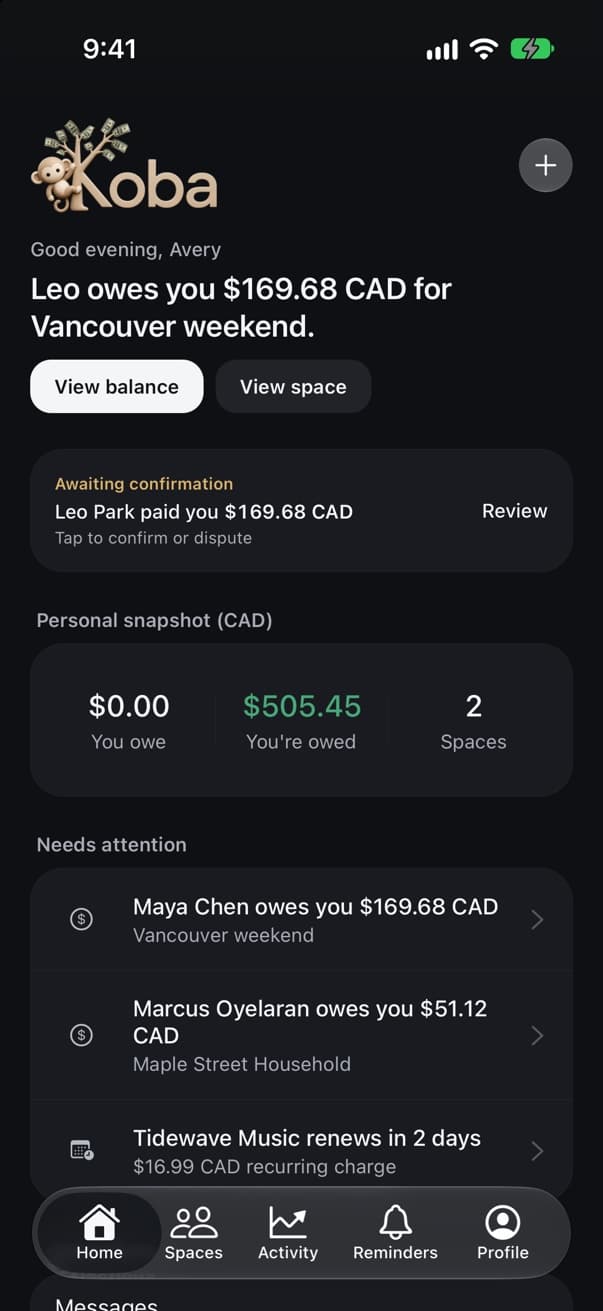
Everything Koba keeps in your chats is also in the iPhone app and on the web, whenever you want it.

Less to keep track of
Text Koba a split or a renewal from the Messages app you already use. No account needed, and your friends never pay.
 Text Koba